Make Your CE Activities Easier to Find: Tips for BOC Approved Providers

Thoughtful activity titles, descriptions and details can help more Athletic Trainers (ATs) find the right continuing education (CE) opportunities.
The updated BOC Activity Directory is designed to make CE activities easier for ATs to browse, search and act on. Now connected to Continuing Professional Certification (CPC) Renewal – powered by Pathfinder, the information you provide when entering an activity can do more than describe your course; it can help ATs discover it when they are looking for learning opportunities that align with their professional needs and goals.
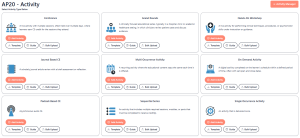
The new BOC Approved Provider Activity Manager makes entering activities simpler and more user-friendly. Activity types guide you through the information most relevant to your specific activity, helping you provide the details ATs need to make informed decisions.
Start with the right activity type
When entering an activity, select the activity type that best matches your offering. The Activity Manager asks for the right information at the right time based on the activity type you enter. This helps streamline the process for BOC Approved Providers while ensuring activity listings include information useful to ATs.
Tip: Take the time to complete the fields provided for your activity type. These details can help make your activity more useful and discoverable in the Activity Directory.
Give your activity a descriptive title
Your activity title is one of the first things an AT sees. A specific title can help them quickly understand the focus of your activity. Avoid titles that are too broad or generic.
Instead of:
Annual Athletic Training Workshop
Try:
Evidence-Based ACL Injury Rehabilitation: From Early Recovery to Return to Sport
A descriptive title gives ATs a better idea of what the activity covers and can make your activity easier to identify when browsing or searching the directory.
Tell ATs what they can expect
Use the activity description to provide useful context about the learning experience.
Consider including:
- The topic or practice area addressed
- The primary focus of the activity
- What ATs can expect to learn
- Who the activity is intended for, when applicable
- Key concepts, skills or issues addressed
- Any information that helps distinguish your activity from similar offerings
Your description does not need to be lengthy. Focus on the information an AT would want to know when considering an activity.
Include meaningful learning outcomes
Learning outcomes can help ATs understand an activity’s value before they register.
Use clear, specific language that describes what learners should know or be able to do after completing the activity.
For example:
Less specific:
Participants will learn about concussion management.
More specific:
Learners will be able to identify current evidence-based strategies for evaluating and managing concussion and apply those strategies to common clinical scenarios.
Clear learning outcomes give ATs a view of the knowledge or skills addressed in the activity.
Complete the details that help ATs find your activity
The Activity Directory includes information that ATs can use to narrow their search, including areas such as:
- CEUs
- Cost
- Date and location
- Format
- Provider
- Practice Analysis domains
- Keywords
- Presenters
- Open/closed status and participant availability
These details aren’t just administrative fields. They can help ATs find activities that match their interests, requirements and availability, while also improving the chances that your activity appears in a relevant search.
Tip: Be specific and accurate. Select the practice analysis domains and keywords that genuinely reflect your activity rather than adding broad or unrelated terms simply to increase visibility.
Think like an AT searching for CE
Before submitting your activity, consider:
“If I were looking for this type of CE, what words would I use?”
Using the terms an AT is likely to search can make your activity easier to discover in the Activity Directory.
Ask yourself:
- Is it immediately clear what topics this activity will cover?
- Would an AT know what they will learn?
- Are the terms an AT might search for included?
- Are the practice analysis domains accurate?
- Is the format, cost, date and CEUs clear?
- Is there enough information to decide whether to learn more?
Keep your listing current
Accurate information helps ATs act on the opportunities they find.
Be sure to update your activity information when details change, including dates, costs, availability, formats or other key information. Also verify that your More Info link works and directs ATs to the information they need to learn more, register or contact your organization.
The right detail makes a difference
The goal isn’t to write more, it’s to provide the right information.
The new Activity Manager was designed to make entering activities easier for BOC Approved Providers while helping create activity listings that are more useful to ATs. By selecting the appropriate activity type and thoughtfully completing the relevant fields, you can help make your CE activities:
- Easier to browse
- Easier to search
- Easier to understand
- Easier to act on
Through Pathfinder, the right activity details can connect ATs with learning opportunities that support their professional development goals.
Ready to update your activities? Log in today and make sure your activity listings have the information ATs need to find and choose your CE activity.